Learn about new product features and improvements we've launched.
FEATURE RELEASE
Incident Prioritization
September 02, 2026
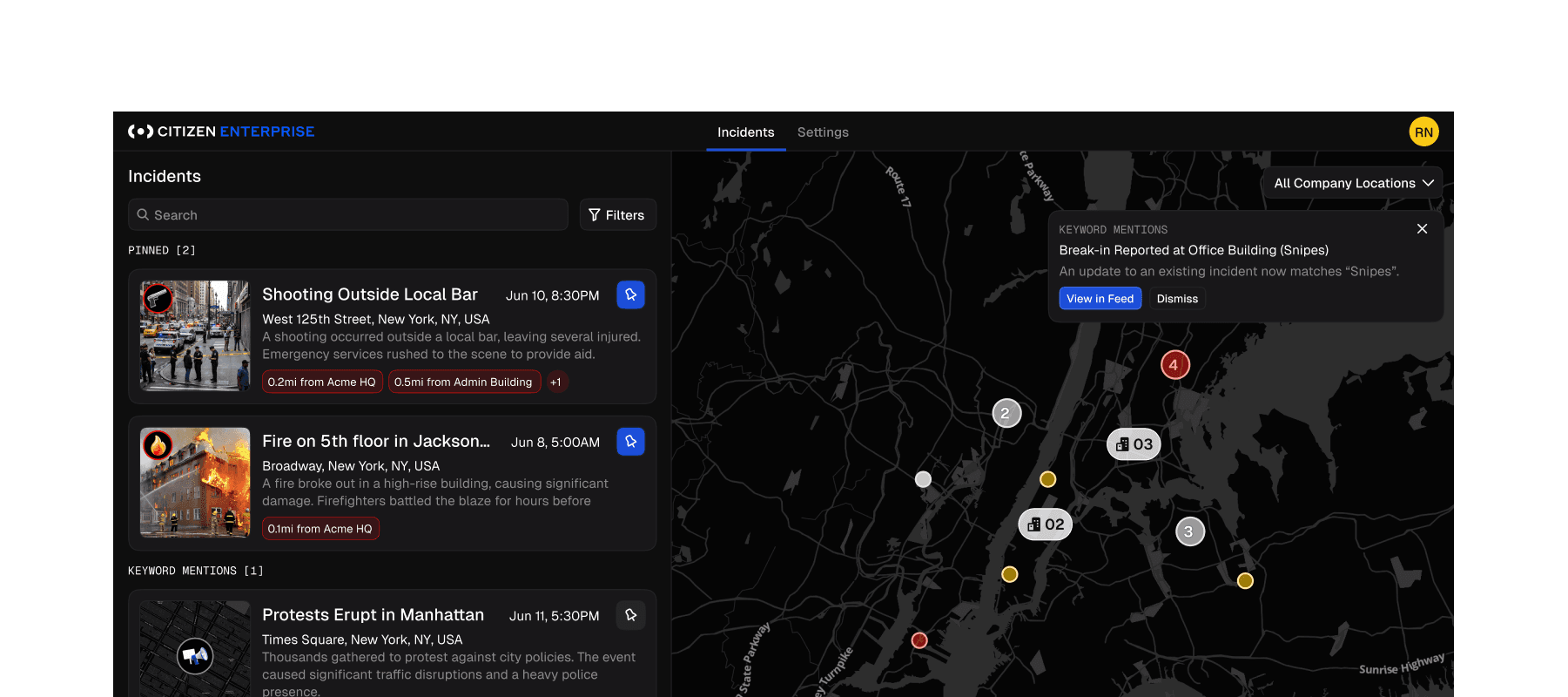
The Enterprise incident feed just stopped being a firehose. Pin what matters, get alerted on the terms you're watching, and let the incidents worth acting on rise to the top. No more scrolling to find them.
Pin the incidents you're watching
Every incident card now has a pin, right next to focus in the sidebar. Pinned incidents jump to a dedicated Pinned section at the top of your feed and stay there, across devices, indefinitely, until you unpin them. A new Pinned toggle in Filters scopes the feed to just your pinned items for the time window you're in.
Track the words that matter to your operation
Build your own keyword categories in Notification Settings and get notified the moment a term shows up in an incident. A location, an asset, a brand mention, whatever your team needs to catch. Matching alerts are labeled clearly in the notification header, so you know why it fired at a glance.
Whether you're a GSOC operator staying locked on a developing situation or a team tracking mentions across the city, this is your feed shaped around your mission, not everyone's.
FEATURE RELEASE
Announcing Our Largest Coverage Expansion
July 29, 2026
Our largest coverage expansion yet: 32 new metro areas, deeper detection in 53 more
Citizen now covers 32 metro areas for the first time, and coverage is deeper in 53 markets we already serve. All of it comes from official police and fire radio — monitored around the clock and turned into real-time incidents, live video, and alerts.
In the 53 existing markets, the added radio does two things: denser detection in the urban core, and first-time coverage of surrounding counties and jurisdictions that weren't on the map before.
New Markets
First-time Citizen coverage. If you have facilities, people, or operations here, you're covered:
Allentown–Bethlehem, PA
Ann Arbor, MI
Birmingham, AL
Bridgeport–Stamford, CT
Brownsville–Harlingen, TX
Cape Coral–Fort Myers, FL
Colorado Springs, CO
Des Moines, IA
Flint, MI
Greensboro–High Point, NC
Hartford, CT
Jacksonville, FL
Lakeland–Winter Haven, FL
Lansing–East Lansing, MI
Louisville, KY
Manchester–Nashua, NH
McAllen–Edinburg, TX
New Orleans–Metairie, LA
Omaha, NE
Poughkeepsie–Newburgh, NY
Reading, PA
Spokane, WA
Springfield, MA
Springfield, MO
Stockton–Lodi, CA
Trenton–Princeton, NJ
Vallejo–Fairfield, CA
Virginia Beach–Norfolk, VA
Wichita, KS
Winston-Salem, NC
York–Hanover, PA
Youngstown–Warren, OH
Expanded Coverage
Deeper detection downtown, first-time coverage in the surrounding counties:
Akron, OH
Albany–Schenectady–Troy, NY
Atlanta, GA
Austin, TX
Baltimore, MD
Boston, MA
Buffalo, NY
Charlotte, NC
Chattanooga, TN
Chicago, IL
Cincinnati, OH
Cleveland, OH
Dallas–Fort Worth, TX
Dayton, OH
Denver, CO
Detroit, MI
Fresno, CA
Houston, TX
Huntsville, AL
Indianapolis, IN
Lancaster, PA
Little Rock, AR
Los Angeles–Orange County, CA
Madison, WI
Miami–Fort Lauderdale, FL
Milwaukee, WI
Minneapolis–St. Paul, MN
New Haven, CT
New York–Newark–Jersey City
Oklahoma City, OK
Orlando, FL
Oxnard–Ventura, CA
Philadelphia, PA
Pittsburgh, PA
Portland, OR
Providence, RI
Raleigh, NC
Riverside–San Bernardino, CA
Rochester, NY
Sacramento, CA
San Antonio, TX
San Diego, CA
San Francisco–Oakland, CA
San Jose, CA
Sarasota–Bradenton, FL
Seattle–Tacoma, WA
St. Louis, MO
Syracuse, NY
Tampa–St. Petersburg, FL
Tucson, AZ
Tulsa, OK
Washington, DC
Worcester, MA
Availability
Live today. To request access to a newly added geo, contact your account manager. If you already pay for access in one of the markets mentioned, you should already be receiving these incidents.
FEATURE RELEASE
Launching Citizen Alert
March 31, 2026
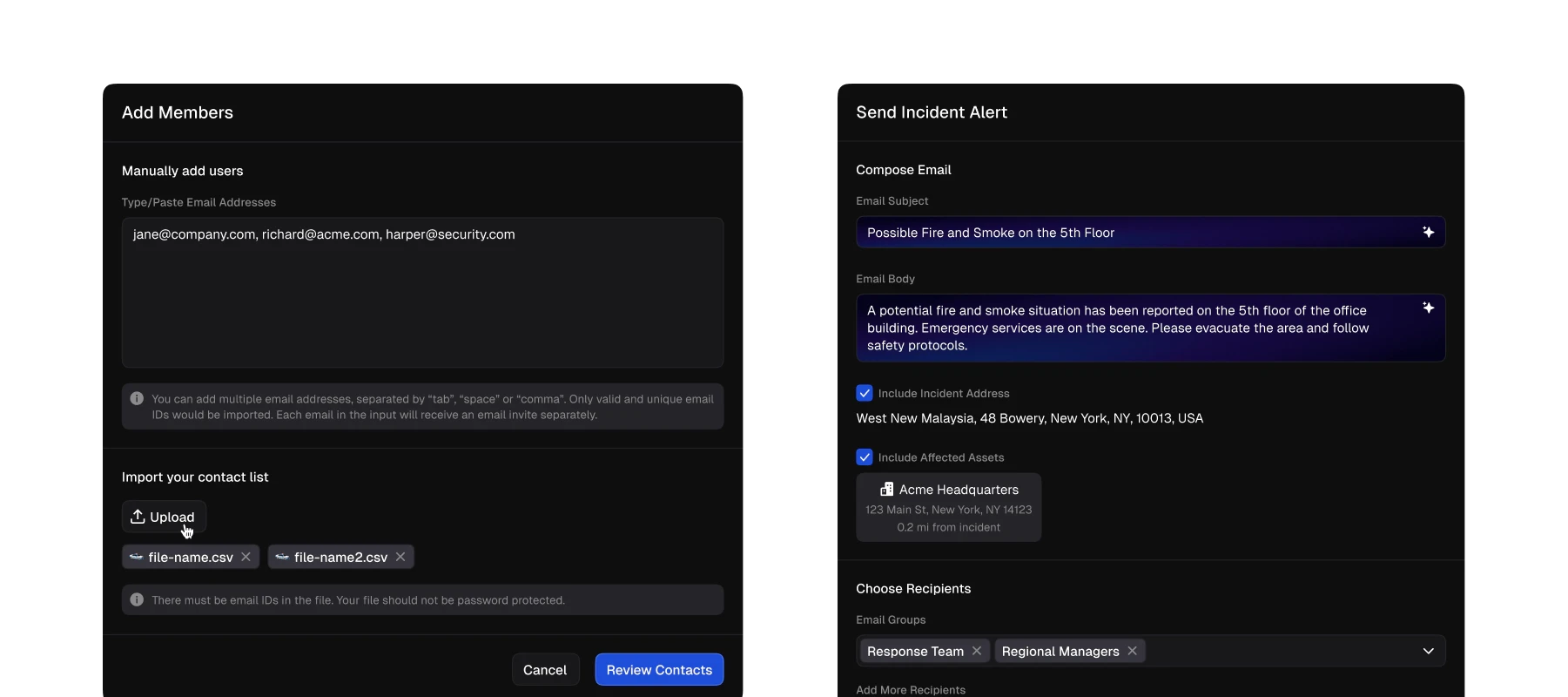
Employee alerting system
Citizen Alert gives organizations a fast, direct way to reach their people when it matters most. Enterprise admins can now send targeted email alerts to employees and team members in response to active incidents. It ensures that the right people get critical information without delay.
With a built-in contact management system, admins can upload employee contact lists via CSV, organize recipients into named distribution groups, and select exactly who to alert at send time. When composing a alert, AI-generated subject lines and body copy are suggested based on the incident—including the incident address and proximity to impacted assets—so admins can send faster while still editing the message to fit their needs. A preview step lets teams review every alert before it goes out.
New role-based permissions give organizations control over who can manage contacts and groups and who can send alerts, keeping the workflow secure and manageable as teams scale. Citizen Alert is available now for eligible Enterprise customers. Reach out to your account team to get started.
FEATURE RELEASE
Asset visibility & location mapping
January 21, 2026
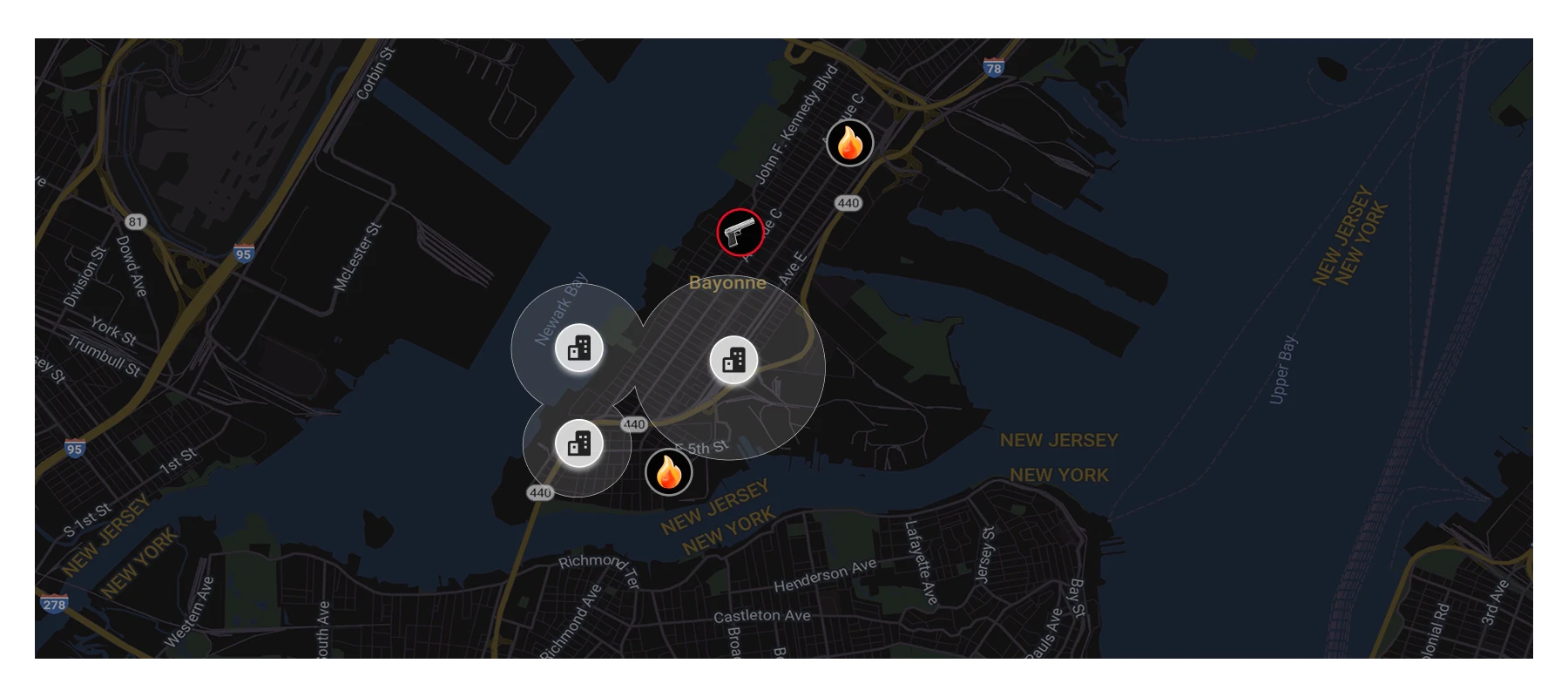
Asset visibility & location mapping
Asset Visibility and Location Mapping gives organizations a clearer, more actionable view of what matters most on the map. Enterprise users can now see alert zone addresses automatically plotted alongside incidents, with category icons that match the mobile experience for faster recognition at a glance.
With the new “My Locations” filter, maps default to showing only the alert zones and assets users actively monitor, reducing noise and surfacing what is relevant. When incidents occur within or near an alert zone, impacted assets are automatically identified and highlighted across the map, home feed, and incident detail pages.
This launch improves situational awareness by connecting incidents directly to real-world locations, helping teams quickly understand impact, prioritize response, and make more informed decisions in real time.
IMPROVEMENTS
Enterprise on mobile
October 30, 2025
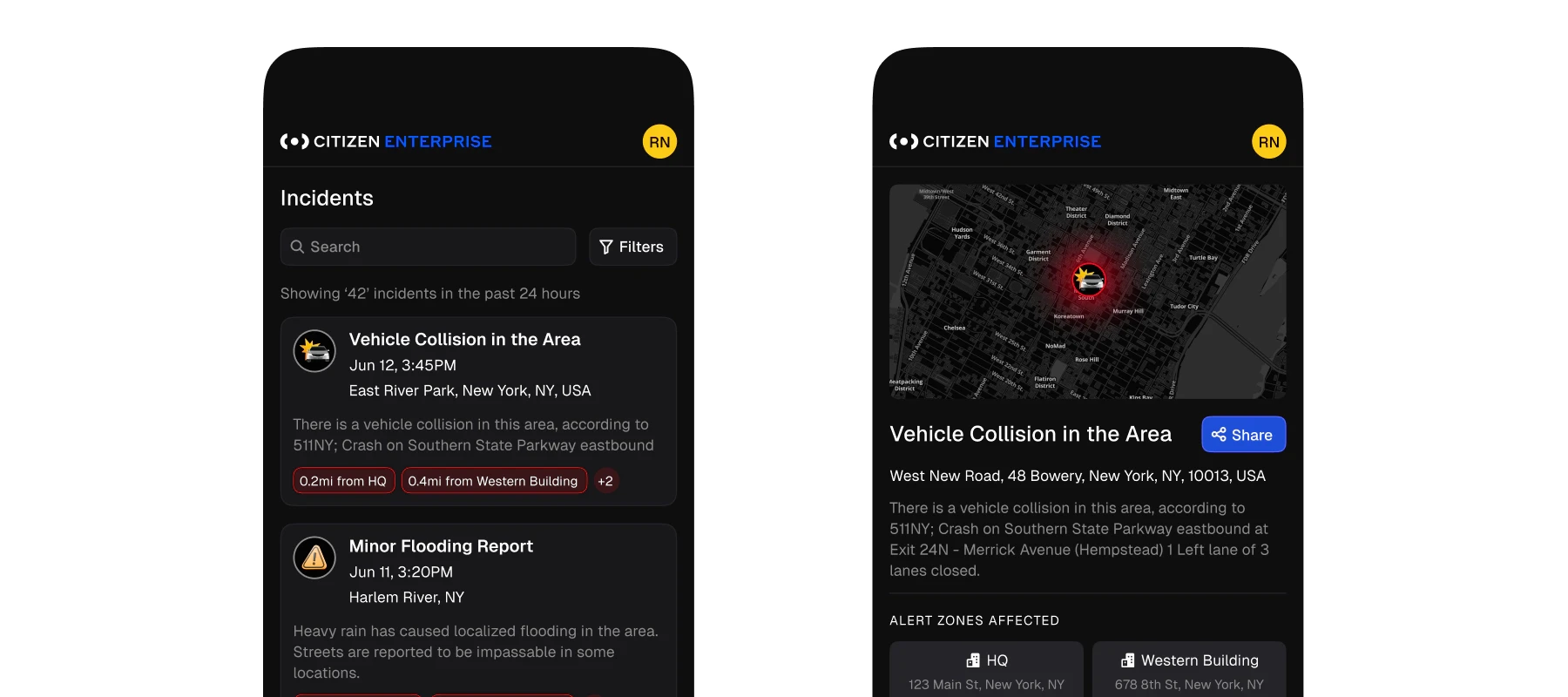
Redesigned mobile view and notifications
Citizen Enterprise now supports mobile browser notifications, making it easier to stay informed on the go. Users can receive notifications on both mobile Safari and Chrome, without needing to install a native app.
The mobile web experience has been optimized across key screens, including Home, Notification Settings, and Incident Details, to ensure reliable performance on mobile devices. Clear, browser-specific guidance helps users add Citizen Enterprise to their home screen as an applet, creating a more app-like experience.
Once added to the home screen, users can quickly enable notifications and receive timely alerts wherever they are. This update brings faster access, improved usability, and real-time awareness to mobile workflows.
FEATURE RELEASE
Historical incidents search & filtering
October 8, 2025
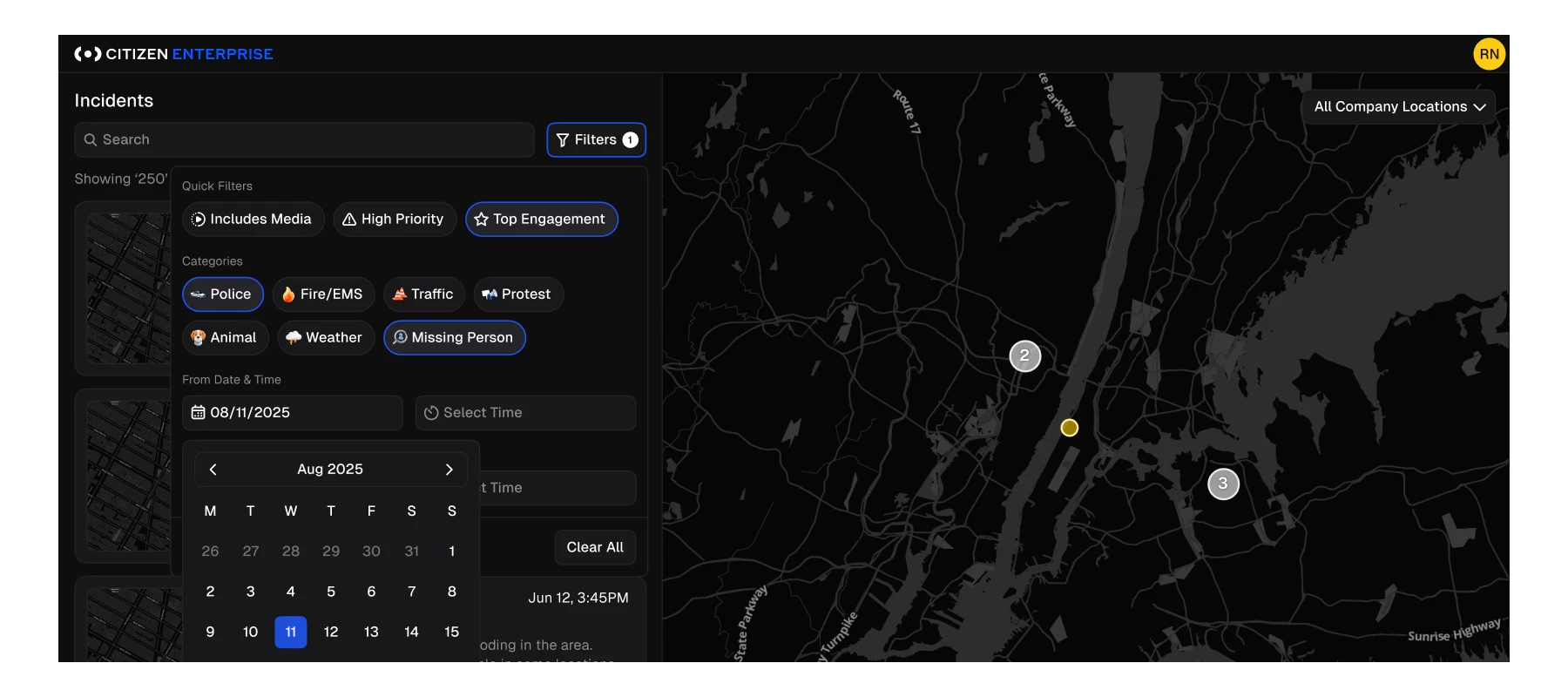
Historical incidents search & filtering
Enterprise users can now access and analyze up to five years of incident history with enhanced search and filtering capabilities. Historical incidents display the same rich detail as real-time incidents, including title, category, location, media, and timestamps, making it easy to investigate trends and past activity with confidence.
New date range filters allow users to narrow results to specific time periods, with clear date and time indicators to ensure context for older incidents. Search results are scoped to active filters for more precise exploration, while sensible limits keep performance fast and predictable. The map experience remains focused on recent activity by default, showing the most recent 24 hours unless filters are applied.
This update gives teams deeper visibility into historical events while preserving a familiar, streamlined workflow.
IMPROVEMENTS
User-level notifications & preferences
July 17, 2025
Web push notification settings & enhancements
Notifications in Citizen Enterprise are now managed at the user level, giving individuals more control over what alerts they receive and where they come from. Each user can customize notification preferences without impacting the rest of their organization.
Users can choose which incident types to receive alerts for and select specific alert zones from their organization’s configured zones. Preferences are easy to manage in Settings, where users can also see how many alert zones and categories are currently enabled at a glance.
All categories and alert zones are enabled by default to ensure full coverage from day one, while new alert zones added later require explicit opt-in. This update delivers more personalized, flexible notifications while maintaining clarity and control for enterprise teams.